
Supplies & Equipment
Every Nossi program has its own art school supply list, so you know exactly what you’ll need before your first class. From laptops to cameras to classroom supplies and everything in between, this page lays out the equipment each program requires. Choose your program below, review the list, and print it or save it as a PDF to take shopping with you.
Updated August 2026. Supplies and equipment are purchased by the student and are not included in tuition. All prices are estimates and subject to change — each program list below shows its own last-updated date.
Art School Supply Lists by Program
Culinary Arts
Last updated: August 2026
Uniform Sets — from Chef Works
Uniforms are required the first day of classes. We recommend purchasing 2–3 full sets. You’ll order uniforms through the Chef Works Nossi store: orderentry.chefworks.com/nossicollege.
- Chef Jackets — a clean, pressed Nossi-logo jacket is required for all culinary classes. $11.95–$23.99
- Check Chef Pants — required for all culinary classes. $17.19–$25.19
- Bib Apron (Black) — $4.88
- Side Towels — two clean towels required for each kitchen class. $0.76 each
- Approved Shoes (not supplied by Chef Works): black only; closed toe and heel; slip-resistant soles (neoprene oil-resistant preferred); water-repellent upper; heel no higher than 2 inches; clean for each class.
Already have check chef pants and bib aprons? You may use them — they must be clean and pressed.
Knife Kit (purchased at orientation)
$421.30 (includes tax). A 3.5% fee applies to credit/debit payments. The Nossi Culinary Knife Kit has every tool you’ll need to progress through the program; utensils not in the kit are provided in our kitchens.
Kit contents:
- Paring Knife — Dexter Russell iCut-PRO® 3″
- Chef Knife — Dexter Russell iCut-PRO® 8″ forged
- Boning Knife — Dexter Russell iCut-PRO® 6″ flexible
- Slicer Knife — Dexter Russell Connoisseur® Roast Slicer 12″
- Bread / Sandwich Knife — Dexter Russell SofGrip™ 10″ scalloped
- Knife blade cover / guard for all knives
- Sharpening Steel — Dexter Russell Sani-Safe® Diamond Sharpener 10″
- Vegetable Peeler — TableCraft FirmGrip® straight peeler
- Dough Cutter / Scraper — Dexter Russell Sani-Safe® 6″×3″
- Utility Tongs — 12″ heavy-duty stainless
- Cake decorating tube tips — sizes 2 & 6 plain; size 2 closed star; size 6 star
- Wooden Spoon — 12″
- Slotted Turner — Dexter Russell Traditional™ Fish Turner 6½″
- Pastry Brush — Carlisle 2″ silicone, heat resistant to 500°F
- Bowl Scraper — American Metalcraft hard plastic
- High-Temp Spatula — Vollrath 10″ silicone
- Measuring Spoon Set — Vollrath 4-piece stainless
- Pocket Thermometer — digital, −50 to +392°F
- Knife Case — Dexter Russell CC6 35-pocket cutlery case
- Nossi Culinary Cap — included in the kit; worn with your uniform in class.
You may use a kit you already own if it contains the equivalent of all items above and includes a knife case. Non-Nossi kits must be inspected before or at orientation by Chef Russell.
Laptop
Wireless, running Microsoft Office 365 — Excel and Word are the software of choice in the hospitality world. Windows 11, with a 13-inch screen or larger recommended.
Graphic & Interactive Design
Last updated: August 2026
Computer
Graphic design software is processor-intensive, so buy the strongest machine your budget allows and plan to keep it for the length of the program. Any of the three MacBook Pro sizes works well; PC alternatives should match the equivalent specs. PC Magazine’s best MacBook Pro alternatives.
| Component | Minimum acceptable | Preferable / safer |
|---|---|---|
| Chip (CPU/GPU) | Apple Silicon (M1 / M2 or later); avoid entry-level models | M2 Pro / M3 / M4, or Pro/Max/Ultra tiers for 3D & motion |
| Unified memory (RAM) | 16 GB | 24–32 GB (especially for video/3D) |
| Storage (SSD) | 512 GB | 1 TB, or 512 GB + fast external SSD |
| Display | Retina / color-accurate | 4K / high color gamut, external monitor support |
| Ports | Enough for drives, monitor, peripherals | Thunderbolt / USB-C with headroom |
| Component | Minimum acceptable |
|---|---|
| Processor | Quad-core Intel i5 or AMD Ryzen 5 (latest generation possible) |
| RAM | 16 GB |
| Storage | 512 GB SSD (NVMe preferred) |
| Graphics | Dedicated GPU with at least 4 GB VRAM (or strong integrated GPU) |
| Display | Full HD (1920×1080) IPS or better, good color |
| Ports / OS | USB-C / USB 3.x, external display output; Windows 11 (64-bit) |
A mouse is recommended but not mandatory — it offers more control and can reduce hand strain, but the choice depends on your workflow and preference.
Software
Your computer must run Adobe Creative Cloud (the Creative Cloud Pro plan). The most essential apps are InDesign, Illustrator, Photoshop, After Effects, XD, Dreamweaver, Media Encoder, Premiere Pro, and Acrobat. Student pricing is $19.99/month for the first year (standard rate applies after) and requires a nossi.edu email address. You’ll need this at the start of the first semester. See current Adobe student pricing · Adobe CC system requirements.
External Hard Drive (recommended)
Get an external drive at least the same size as your computer’s drive, for backups and transferring files.
Basic Drawing Kit (needed for your first semester)
The Nossi Basic Drawing Kit contains the materials you’ll need for your Basic Drawing class, available from Jerry’s Artarama. Order the Nossi Kit online at the link below, or ask for it by name at the Nashville store. Each kit is $107.99 (plus sales tax) and comes with a free zippered storage bag and a Jerry’s tote bag.
Jerry’s Artarama — Nashville: 713 Main Street, Nashville, TN 37206 • (615) 731-5901 • nashville@jerrysartarama.com
Kit contents:
- SOHO Drawing Pad, 92 lb, 18×24
- Strathmore 300 Newsprint Pad, 18×24
- Reflexions Sketchbook, 8.5×11
- Strathmore 400 2-Ply Bristol, smooth, 22×30 sheet
- Krylon Workable Fixative, 11 oz
- Ta-Da Bamboo 2-Brushes-in-1 (#2 & #8)
- Sharpie Marker, fine, black
- Super Sharpie Marker, black
- Micron Pen 3-Set, black (01/03/05)
- Blending Stumps #4 (1 dozen)
- Cezanne Graphite Pencils, 12-set
- Kum Magnesium Pencil Sharpener, 1-hole
- Conté 2B Black, 2-pack
- Speedball Super Black India Ink, 2 oz
- Pink Pearl 101 Large Eraser
- Prismacolor Kneaded Eraser, large (#1224)
- Acurit Ruler, 24 in / 60 cm
- Acurit #1 Knife with cap
Illustration Technologies
Last updated: August 2026
Computer
Illustration software is processor-intensive, so buy the strongest machine your budget allows. Any of the three MacBook Pro sizes works well; PC alternatives should match the equivalent specs. PC Magazine’s best MacBook Pro alternatives.
| Component | Minimum acceptable | Preferable / safer |
|---|---|---|
| Chip (CPU/GPU) | Apple Silicon (M1 / M2 or later); avoid entry-level models | M2 Pro / M3 / M4, or Pro/Max/Ultra tiers for 3D & motion |
| Unified memory (RAM) | 16 GB | 24–32 GB (especially for video/3D) |
| Storage (SSD) | 512 GB | 1 TB, or 512 GB + fast external SSD |
| Display | Retina / color-accurate | 4K / high color gamut, external monitor support |
| Ports | Enough for drives, monitor, peripherals | Thunderbolt / USB-C with headroom |
| Component | Minimum acceptable |
|---|---|
| Processor | Quad-core Intel i5 or AMD Ryzen 5 (latest generation possible) |
| RAM | 16 GB |
| Storage | 512 GB SSD (NVMe preferred) |
| Graphics | Dedicated GPU with at least 4 GB VRAM (or strong integrated GPU) |
| Display | Full HD (1920×1080) IPS or better, good color |
| Ports / OS | USB-C / USB 3.x, external display output; Windows 11 (64-bit) |
Software
Your computer must run Adobe Creative Cloud (the Creative Cloud Pro plan): InDesign, Illustrator, Photoshop, After Effects, XD, Dreamweaver, Media Encoder, Premiere Pro, Acrobat. Student pricing is $19.99/month for the first year (standard rate applies after), with a nossi.edu email address, needed at the start of the first semester. See current Adobe student pricing.
External Hard Drive (recommended)
At least the same size as your computer’s drive, for backups and transfers.
Basic Drawing Kit (needed for your first semester)
The Nossi Basic Drawing Kit contains the materials you’ll need for your Basic Drawing class, available from Jerry’s Artarama. Order the Nossi Kit online at the link below, or ask for it by name at the Nashville store. Each kit is $107.99 (plus sales tax) and comes with a free zippered storage bag and a Jerry’s tote bag.
Jerry’s Artarama — Nashville: 713 Main Street, Nashville, TN 37206 • (615) 731-5901 • nashville@jerrysartarama.com
Kit contents:
- SOHO Drawing Pad, 92 lb, 18×24
- Strathmore 300 Newsprint Pad, 18×24
- Reflexions Sketchbook, 8.5×11
- Strathmore 400 2-Ply Bristol, smooth, 22×30 sheet
- Krylon Workable Fixative, 11 oz
- Ta-Da Bamboo 2-Brushes-in-1 (#2 & #8)
- Sharpie Marker, fine, black
- Super Sharpie Marker, black
- Micron Pen 3-Set, black (01/03/05)
- Blending Stumps #4 (1 dozen)
- Cezanne Graphite Pencils, 12-set
- Kum Magnesium Pencil Sharpener, 1-hole
- Conté 2B Black, 2-pack
- Speedball Super Black India Ink, 2 oz
- Pink Pearl 101 Large Eraser
- Prismacolor Kneaded Eraser, large (#1224)
- Acurit Ruler, 24 in / 60 cm
- Acurit #1 Knife with cap
Course-Specific Requirements
These items are required by day one of specific courses, as they’ll be used daily. Your instructor will notify you before the semester starts so you’re prepared.
Connector for the Wacom Cintiqs — $20–$200
Required for Advanced Photoshop (Digital Painting) and Adobe for Illustrators. You’ll attach your laptop to the studio Cintiq drawing monitors and use them for your in-class work — the Cintiqs are essential tools for hands-on experience in a professional studio environment.
The connector is an affordable device that allows your laptop to connect to both USB and HDMI simultaneously. Prices range from $20 to $200, depending on your choice. This connector enables your laptop’s USB Type-C port to connect to USB, HDMI, and other options. Below is a sample image of what a connector might look like.
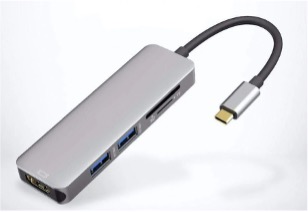
You’ll also need to download the latest Wacom drivers for the Cintiq — your instructor will guide you through this. Download Wacom drivers.
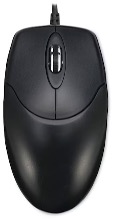
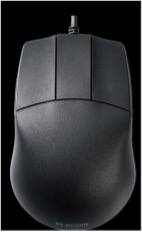
3-Button Mouse — $5–$200
Required for Intro to 3D and Animation and Exploring 3D. A 3-button mouse is essential and required for working in 3D. While it’s possible to do the work without a mouse, this is not recommended — working without one is slower and not standard practice in the industry.
There is a wide range of 3-button mouse options available online. Prices range from $5 to $200, depending on your choice. The third button is especially important for navigating in the 3D environment. You can purchase either a Mac- or PC-compatible mouse, depending on your personal preference. Below are sample images of what a 3-button mouse might look like.
Photography
Last updated: August 2026
Computer
You’ll need a laptop that can run the current Adobe software. Used or refurbished machines are completely fine — a Mac that’s two or three years old works just as well as a brand-new one, and it’s a great way to save.
Mac — minimum to run current Adobe
- macOS Sonoma (14) or newer
- 8 GB RAM (16 GB for Apple Silicon)
- A GPU with Metal support
Budget tips: The Apple MacBook Neo (13-inch, A18 Pro) starts at $599 through the Apple Education Store for current and newly accepted college students — the same machine runs roughly $700 at other retailers, so buy it through Apple Education if you qualify. A used or refurbished MacBook Pro (13-inch or 15-inch) is also a great value — try Apple’s refurbished store (20–30% off, 1-year warranty) or Mac of All Trades (student discount, monthly payments via Affirm, 1-year warranty).
One caution on the Neo: the base model ships with 8 GB of memory and a 256 GB drive. That will run the software, but it sits at the low end of the specs above — and 256 GB fills up fast once you start shooting. If the Neo is your pick, step up to the larger drive if you can, and plan on an external drive either way.
PC (Windows) — minimum to run current Adobe
- Windows 11 (24H2)
- Intel 6th-gen or AMD Ryzen 1000-series CPU (or newer)
- 8 GB RAM (16 GB for HD editing, 32 GB for 4K)
- 4 GB GPU VRAM
- 8 GB free disk space
Budget tip: Back Market sells refurbished Windows laptops.
Not recommended: Chromebooks can’t run Adobe software (they’re web-only), and iPads don’t support Lightroom Classic and offer only limited Adobe functionality.
Software
You’ll need Adobe Creative Cloud (the Creative Cloud Pro plan), which includes Lightroom, Photoshop, and the full suite of creative apps. Student pricing is $19.99/month for the first year (standard rate applies after), with a nossi.edu email address. See current Adobe student pricing.
External Hard Drive (recommended)
At least the same size as your computer’s drive, for backups and transfers.
Camera Suggestions
Mirrorless cameras have become the choice of professional photographers. At some point you’ll be moving toward a mirrorless camera, so it’s best to invest now so you don’t have lenses that aren’t compatible when you upgrade. We recommend mirrorless for students because it is replacing the DSLR — Canon and Nikon, the largest manufacturers of DSLRs, have phased out production.
Photography students will learn to shoot video. Most working photographers and videographers handle both stills and motion, so it’s worth choosing a camera that does both well even if you plan to concentrate on still images.
We encourage you to research and find what’s best for you:
- Read online forums.
- Visit a camera store and try them out. Pixel Connection in Nashville is a good place to see your options.
- Read or watch reviews that compare the cameras you’re thinking about.
- Discuss your options with your program instructors.
- Our students use many different brands of cameras — ask your fellow classmates.
Here’s a basic list of suggested cameras. Camera makers upgrade or introduce models continually.
Minimum Options
- 24.2MP APS-C CMOS sensor
- DIGIC X image processor
- UHD 4K30p video
- Dual Pixel CMOS AF II, 651 points
- 2.36m-dot electronic viewfinder
- 3.0″ 1.62m-dot vari-angle touchscreen
- 15 fps electronic shutter
- Close-Up Demos & Vertical Movie modes
- RF-S 18–45mm f/4.5–6.3 IS STM lens
- 20.9MP DX-format CMOS sensor
- EXPEED 6 image processor
- UHD 4K and Full HD video
- 2.36m-dot OLED electronic viewfinder
- 3.2″ 1.04m-dot 180° tilting touchscreen
- ISO 100–51200, up to 11 fps
- 209-point hybrid AF, Eye Detection
- Built-in Wi-Fi and Bluetooth
- NIKKOR Z DX 16–50mm f/3.5–6.3 VR lens
Already own a Canon Rebel, or a Nikon D3200 / D3400 / D3500? You can use it — but don’t buy one new, they’re already obsolete. If you have an entry-level Canon or Nikon with an 18–55mm kit lens, adding a 50mm f/1.4 (about $200) is highly recommended.
Recommended — No Upgrade Needed While in School
- 24MP full-frame Exmor R BSI CMOS sensor
- BIONZ X processor & front-end LSI
- 693-point hybrid AF system
- UHD 4K30p with HLG & S-Log3
- 2.36m-dot Tru-Finder OLED EVF
- 3.0″ 922k-dot tilting touchscreen
- 5-axis SteadyShot INSIDE stabilization
- ISO 204800 and 10 fps
- Wi-Fi and NFC, dual SD slots
- USB-C port, weather-sealed design
- FE 24–105mm f/4 G OSS lens
- 20MP full-frame CMOS sensor
- DIGIC X image processor
- 4K60 and FHD 120 10-bit internal video
- Sensor-shift 5-axis image stabilization
- 12 fps mech. / 20 fps e. shutter
- Dual Pixel CMOS AF, 1053 points
- 3.69m-dot OLED EVF
- 3.2″ vari-angle touchscreen
- Subject tracking with deep learning
- RF 24–105mm f/4L IS USM lens
- 24.5MP FX-format BSI CMOS sensor
- Dual EXPEED 6 processors
- UHD 4K30 video; N-Log & 10-bit HDMI out
- 14 fps, ISO 100–51200
- 273-point phase-detect AF
- 3.6m-dot OLED electronic viewfinder
- 3.2″ 2.1m-dot tilting touchscreen
- 5-axis in-body vibration reduction
- Dual memory card slots
Refurbished & Used Options
There’s no reason you can’t buy used — new models release every year, so you can benefit as others upgrade. Sample used builds:
- Sony a7 II ($600) + Sony FE 20–70mm f/4 G ($900) = $1,500
- Nikon Z6 ($750) + Nikon Z 24–70 f/4 ($500) = $1,250
- Canon R6 ($1,500) + Canon 24–105 f/4 ($950) = $2,450
On used gear, a 2-year warranty ($99–$149) is worth it — most repairs start around $400. Trusted sellers: KEH (Atlanta), Used Camera Pro (Indianapolis), B&H Photo/Video (NYC).
Learn more: Mirrorless vs DSLR cameras — 10 key differences.
Video & Content Creation
Last updated: August 2026
Computer
You’ll need a laptop that can run the current Adobe software. Used or refurbished machines are completely fine — a Mac that’s two or three years old works just as well as a brand-new one, and it’s a great way to save.
Mac — minimum to run current Adobe
- macOS Sonoma (14) or newer
- 8 GB RAM (16 GB for Apple Silicon)
- A GPU with Metal support
Budget tips: The Apple MacBook Neo (13-inch, A18 Pro) starts at $599 through the Apple Education Store for current and newly accepted college students — the same machine runs roughly $700 at other retailers, so buy it through Apple Education if you qualify. A used or refurbished MacBook Pro (13-inch or 15-inch) is also a great value — try Apple’s refurbished store (20–30% off, 1-year warranty) or Mac of All Trades (student discount, monthly payments via Affirm, 1-year warranty).
One caution on the Neo: the base model ships with 8 GB of memory and a 256 GB drive. Video files are large and 256 GB fills up fast, so step up to the larger drive if you can, and plan on an external drive either way.
PC (Windows) — minimum to run current Adobe
- Windows 11 (24H2)
- Intel 6th-gen or AMD Ryzen 1000-series CPU (or newer)
- 8 GB RAM (16 GB for HD editing, 32 GB for 4K)
- 4 GB GPU VRAM
- 8 GB free disk space
Budget tip: Back Market sells refurbished Windows laptops.
Not recommended: Chromebooks can’t run Adobe software (they’re web-only), and iPads don’t support Lightroom Classic and offer only limited Adobe functionality.
Software
The full Adobe Creative Cloud (the Creative Cloud Pro plan) is required — you’ll begin learning Adobe Premiere Pro in your second semester. Student pricing is $19.99/month for the first year (standard rate applies after), with a nossi.edu email address. See current Adobe student pricing.
External Hard Drive (recommended)
At least one drive, at least the same size as your computer’s drive, for backups and transfers.
Camera Suggestions
A camera is required your first semester — one with manual exposure that shoots both video and photos. Mirrorless cameras have become the choice of professional photographers. At some point you’ll be moving toward a mirrorless camera, so it’s best to invest now so you don’t have lenses that aren’t compatible when you upgrade. We recommend mirrorless for students because it is replacing the DSLR — Canon and Nikon, the largest manufacturers of DSLRs, have phased out production.
Video students will learn to shoot photos. Most working videographers and photographers handle both motion and stills, so it’s worth choosing a camera that does both well even if you plan to concentrate on video.
We encourage you to research and find what’s best for you:
- Read online forums.
- Visit a camera store and try them out. Pixel Connection in Nashville is a good place to see your options.
- Read or watch reviews that compare the cameras you’re thinking about.
- Discuss your options with your program instructors.
- Our students use many different brands of cameras — ask your fellow classmates.
Minimum Options
- 24.2MP APS-C Exmor CMOS sensor
- UHD 4K30p and Full HD 120p video
- 3.0″ side flip-out touchscreen LCD
- 425-point fast hybrid AF
- Up to 11 fps, ISO 100–32000
- Real-time Eye AF and tracking
- Background defocus & face priority AE
- Directional 3-capsule mic and windscreen
- Headphone and microphone ports
- E PZ 16–50mm f/3.5–5.6 OSS lens
- 24.2MP APS-C Exmor CMOS sensor
- BIONZ X image processor
- Real-time Eye AF & real-time tracking
- XGA Tru-Finder 2.36m-dot OLED EVF
- 3.0″ 921.6k-dot 180° tilting touchscreen
- Internal UHD 4K video, S-Log3, HLG
- Built-in Wi-Fi with NFC
- 425 phase- & contrast-detect AF points
- Up to 11 fps, ISO 102400
- E PZ 16–50mm f/3.5–5.6 OSS II lens
- 24.2MP APS-C CMOS sensor
- DIGIC X image processor
- UHD 4K30p video
- Dual Pixel CMOS AF II, 651 points
- 2.36m-dot electronic viewfinder
- 3.0″ 1.62m-dot vari-angle touchscreen
- 15 fps electronic shutter
- Close-Up Demos & Vertical Movie modes
- RF-S 18–45mm f/4.5–6.3 IS STM lens
Already have a Canon Rebel or Nikon D3200 / D3400 / D3500? You can use it — but don’t buy one new, it’s already obsolete.
Recommended — No Upgrade Needed While in School
- 24MP full-frame Exmor R BSI CMOS sensor
- BIONZ X processor & front-end LSI
- 693-point hybrid AF system
- UHD 4K30p with HLG & S-Log3
- 2.36m-dot Tru-Finder OLED EVF
- 3.0″ 922k-dot tilting touchscreen
- 5-axis SteadyShot INSIDE stabilization
- ISO 204800 and 10 fps
- Wi-Fi and NFC, dual SD slots
- USB-C port, weather-sealed design
- FE 24–105mm f/4 G OSS lens
- 20MP full-frame CMOS sensor
- DIGIC X image processor
- 4K60 and FHD 120 10-bit internal video
- Sensor-shift 5-axis image stabilization
- 12 fps mech. / 20 fps e. shutter
- Dual Pixel CMOS AF, 1053 points
- 3.69m-dot OLED EVF
- 3.2″ vari-angle touchscreen
- Subject tracking with deep learning
- RF 24–105mm f/4L IS USM lens
- 40MP APS-C X-Trans CMOS 5 HR BSI sensor
- 4K 60p, 6.2K 30p 4:2:2 10-bit video
- 7-stop in-body image stabilization
- 425-point intelligent hybrid AF
- 3.69m-dot OLED electronic viewfinder
- 3″ 1.84m-dot tilting touchscreen
- 20 fps e. / 15 fps mech. shutter
- 160MP pixel shift multi-shot
- Bluetooth and Wi-Fi
- XF 16–80mm f/4 R OIS WR lens
- 25.2MP BSI CMOS Micro Four Thirds sensor
- 4K60 4:2:2 10-bit unlimited recording
- 5.7K60, 4K120 HFR & FHD 240p VFR
- ProRes RAW, 32-bit float, 13+ stop WDR
- Dual I.S. 7.5-stop 5-axis stabilizer
- 3.68m-dot OLED electronic viewfinder
- 3.0″ 1.84m-dot free-angle touchscreen
- CFexpress Type B & SD UHS-II slots
- DG Vario-Elmarit 12–35mm f/2.8 ASPH lens
- Bright 1500 cd/m² tilting HDR LCD
- Super35 HDR sensor, Gen 5 color science
- Dual XLR inputs, Canon active EF mount
- NP-F570 battery, built-in ND filters
- Record 6K 6144×3456 up to 50 fps
- Dual native 400 & 3200 ISO to 25,600
- CFast 2.0 & SD/UHS-II card slots
- Record up to 120 fps windowed HD
- USB-C recording, 3D LUT support
- 13-stop dynamic range, autofocus support
Refurbished & Used Options
- Sony a6300 ($550) + 16–50mm f/3.5–5.6 ($100) = $650
- Sony a7 II ($600) + Sony FE 20–70mm f/4 G ($900) = $1,500
- Canon R6 ($1,500) + Canon 24–105 f/4 ($950) = $2,450
A 2-year warranty ($99–$149) is a smart buy on used gear. Trusted sellers: KEH, Used Camera Pro, B&H Photo/Video.
Support Gear — When You’ll Need It
Tripod — needed by week 6 of the first semester
Must be durable (be careful with plastic), with a head that moves left/right and up/down smoothly. New budget options run about $100; pawn shops and flea markets can be $30. Best budget tripods guide.
Audio Recorder — needed by semester 5–6
Zoom H4n Pro, about $130.
Headphones — needed by semester 5–6 ($100–$200)
Over-ear (not earbuds); avoid headphones that add bass or color the sound.
Bounce / Reflection Card — needed by semester 5–6
Various prices.
Shoulder Rig & Accessories — 7th semester / optional
Gimbal, Steadicam, or self-built rig; plus optional Glidecam, Glide Track, and a shotgun or on-board mic.
Before You Buy
Supplies and equipment are purchased by the student and are not included in tuition. All prices shown are estimates and subject to change. Camera and computer models are updated regularly — always confirm current pricing with the retailer, and check Adobe’s student page for live software pricing.
Helpful links: Find your textbooks (Booklist) • Adobe student pricing
Questions about equipment? Reach out to your program instructor.
Nashville’s Career Launchpad for Creative Leaders